How to move from Instapaper to ReadMeliora
Moving from Instapaper takes two files and a few minutes. Export your articles as a CSV from Instapaper's settings, then import that file under Settings › Import in ReadMeliora. You see exactly what will come across before anything is saved.
You don't have to leave Instapaper to try this. Import a copy, use both for a while, and decide later.
Step 1: export from Instapaper
Sign in to Instapaper on the web, open your settings, and find the export option. Choose the CSV export. Instapaper downloads a file with one row per article: its address, title, folder, the date you saved it, and any text you selected when saving.
Step 2: import into ReadMeliora
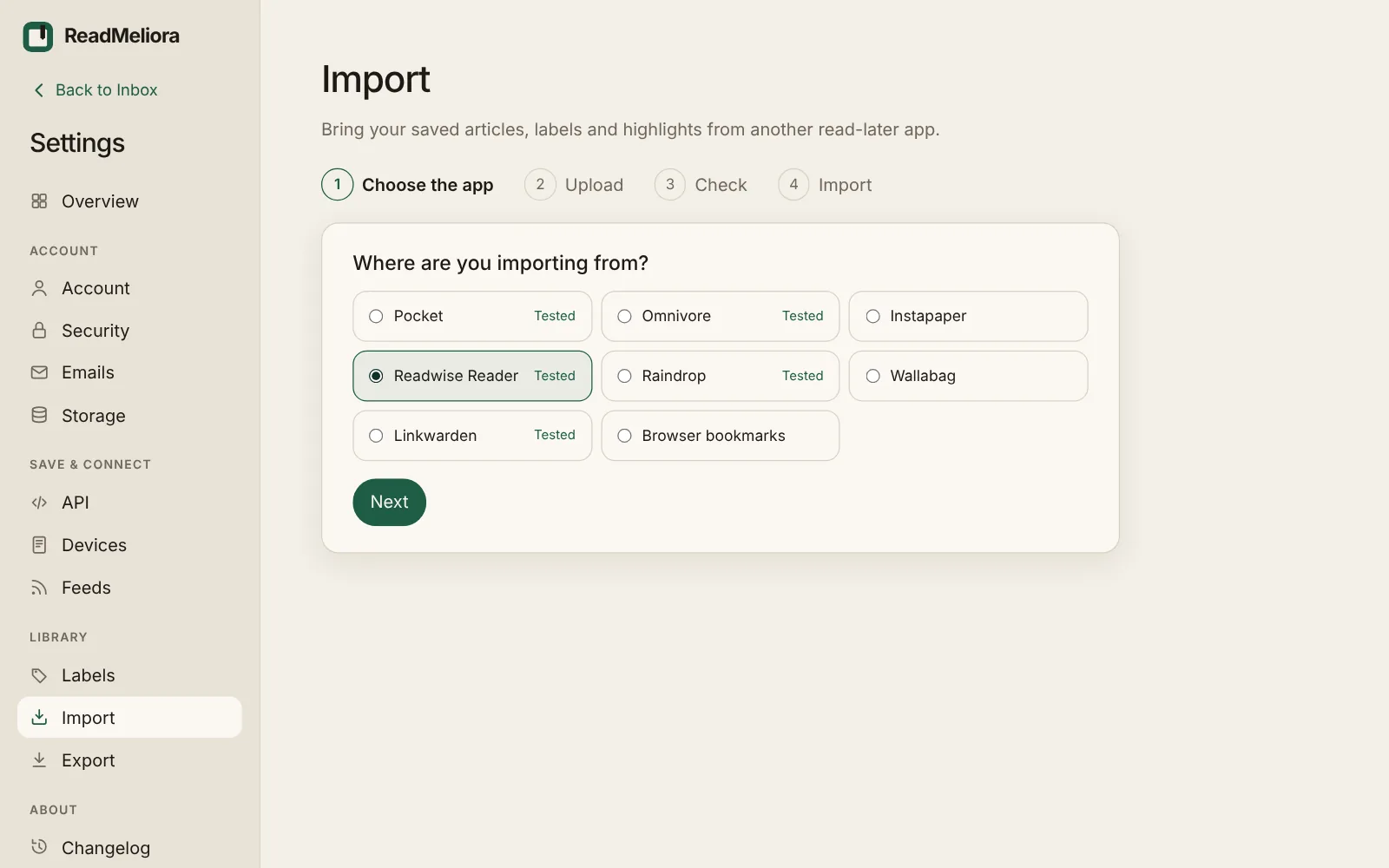
- In ReadMeliora, open Settings › Import, choose Instapaper, then Next.
- Choose the CSV and Upload and check.
- Look through the preview: new Articles, Labels, Already saved, and Left out, with the reason.
- Rename or merge labels if you want to, then choose Import.
Articles are added in the background, and you get a notice and one email when it's done.
What comes across
| From Instapaper | In ReadMeliora |
|---|---|
| Unread | Inbox |
| Archive | Archive |
| Starred | A label called Favorite |
| Your own folders | Labels |
| Tags (newer exports) | Labels |
| Text you selected when saving | A highlight on that article |
| The date you saved it | Kept |
What doesn't, and why
- Article text is fetched again. Instapaper's CSV holds links, not the text. ReadMeliora fetches each page in the background, so pages that have gone offline since can't come back.
- Only one highlight per article. The CSV carries the one selection you made when saving, not every highlight and note you made later.
- PDFs you uploaded to Instapaper aren't in the CSV. Download any you want to keep and save them to ReadMeliora as files.
We built the Instapaper importer from Instapaper's export format, but we haven't yet tested it on a real export. If the preview looks wrong, choose Something's off? Send us the file, and we'll import it for you.
Things that work differently
- Search, notes and Listen are free. On Instapaper, full-text search, unlimited notes and the PDF reader are Premium. In ReadMeliora they are on the free plan.
- Newsletters. Instapaper and ReadMeliora both give you an email address for newsletters. Yours is under Settings › Emails. Mail from your account email is always saved; add any other sender under Allowed senders.
- Unread until you say so. Opening an article doesn't mark it read.
- No Kindle delivery. If you send articles to a Kindle, Instapaper does that and we don't.
Frequently asked questions
Will my Instapaper highlights come across? Only the text you selected when you saved each article. Highlights you made later aren't in Instapaper's CSV.
Do I lose anything in Instapaper by importing? No. Exporting a CSV doesn't change your Instapaper account.
Is ReadMeliora free? Yes. There will always be a free tier. We plan to add a paid tier as well, so we can be around for a long time.
Try it
Create a free account, import your CSV, and read one article in both apps side by side. For a full comparison, see Instapaper Alternative.
Have we got anything wrong? Tell us through the support bubble and we'll correct this article.
Keep reading
What Instapaper's free plan leaves out, and where to get it free
Instapaper Premium costs $5.99 a month. Here is exactly what the free plan leaves out, what Premium adds, and which of those you can get free elsewhere.
How to read YouTube videos as text, with a synced transcript
Save a YouTube video with its transcript, read it like an article, highlight the good parts and search it later. Here is how, free.
Instapaper Alternative: ReadMeliora compared with Instapaper
Tired of paying for Instapaper's search and notes? Here's how ReadMeliora compares, and how to bring your library across.