How to read YouTube videos as text, with a synced transcript
Plenty of YouTube videos are really essays: a talk, a lecture, an interview. You can read them faster than you can watch them. ReadMeliora saves a YouTube video with its transcript, so you can read it like an article, highlight lines, search it later, or have it read aloud, with the video right beside it.
Save a video with its transcript
Transcripts come through the ReadMeliora extension for Chrome.
- Install the ReadMeliora extension and choose Connect to ReadMeliora. It takes one click.
- Open the video on YouTube.
- Open the extension. On a YouTube video the main button says Save for watching. Choose it.
To pick the transcript's language, use Transcript language in the extension before you save. It remembers your choice. If a video has no captions in that language, it uses YouTube's translation.
A YouTube link saved any other way, by pasting it or sharing it from your phone, plays in ReadMeliora but has no transcript. Save it again from the extension to add one.
Read it
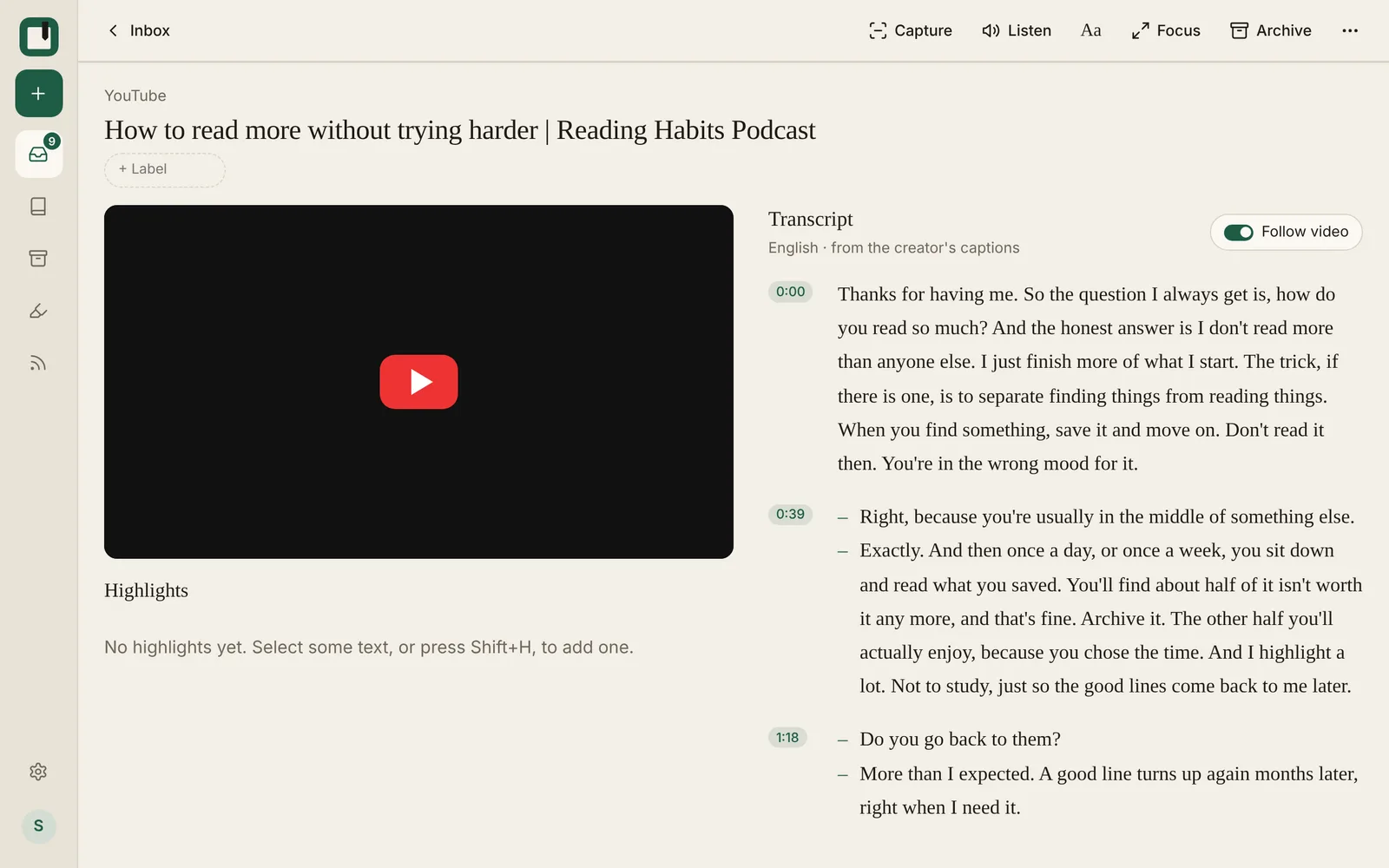
On a wide screen, the video sits on the left and the transcript on the right. On a phone, the video stays pinned at the top while the transcript scrolls underneath.
- The transcript follows the video as it plays. Turn Follow video off to scroll on your own.
- Tap any line to jump the video there.
- New speakers start on their own line, with a dash.
- The heading says which language the transcript is in, and whether it's auto-generated or the creator's own captions.
Highlight, search and listen
- Highlight a line of the transcript as you would in an article, with a note and tags. It shows on your Highlights page with everything else.
- Search finds words inside transcripts, so you can find "that thing someone said in a video" months later.
- Listen reads the transcript aloud, if you'd rather not watch at all.
- Aa sets the transcript's font and size.
Why read instead of watch?
- It's faster. Most people read faster than people talk.
- You can skim. Jump past the intro and the sponsor read.
- You keep the good parts. Highlights stay with the video and on your Highlights page.
- It's quieter. Read a talk on the train without headphones.
Frequently asked questions
Does this work on my phone? Saving with a transcript needs the Chrome extension on a computer. Once saved, you can read the video and its transcript on any device.
What if a video has no captions at all? Then there's no transcript to save. The video still plays in ReadMeliora.
Can I keep videos offline? No. Videos need a connection.
Is ReadMeliora free? Yes. There will always be a free tier. We plan to add a paid tier as well, so we can be around for a long time.
Try it
Create a free account, install the extension, and save the next long talk you mean to watch.
Have we got anything wrong? Tell us through the support bubble and we'll correct this article.
Keep reading
What Instapaper's free plan leaves out, and where to get it free
Instapaper Premium costs $5.99 a month. Here is exactly what the free plan leaves out, what Premium adds, and which of those you can get free elsewhere.
How to move from Instapaper to ReadMeliora
Export a CSV from Instapaper, import it into ReadMeliora, and check what comes across before anything is saved. Here is every step.
Instapaper Alternative: ReadMeliora compared with Instapaper
Tired of paying for Instapaper's search and notes? Here's how ReadMeliora compares, and how to bring your library across.