Inbox, Library, and Archive: unread until you say so
Skimming is not the same as finishing. A lot of apps mark an item read the moment you open it. That makes the list look tidy and tells you nothing about what you actually read.
ReadMeliora splits your stuff into three places. Unread stays unread until you say otherwise.
Inbox
Work in progress lives here. Anything new lands in Inbox first: extension clips, pasted URLs, forwarded mail, feed posts, Share from your phone. Each row shows reading time so you can pick something that fits.
Library
Library is the set you are keeping on purpose. Read and unread can sit together. Move an item here when you want it in the long pile, not just the “get to this week” pile. Mark unread again anytime.
Archive
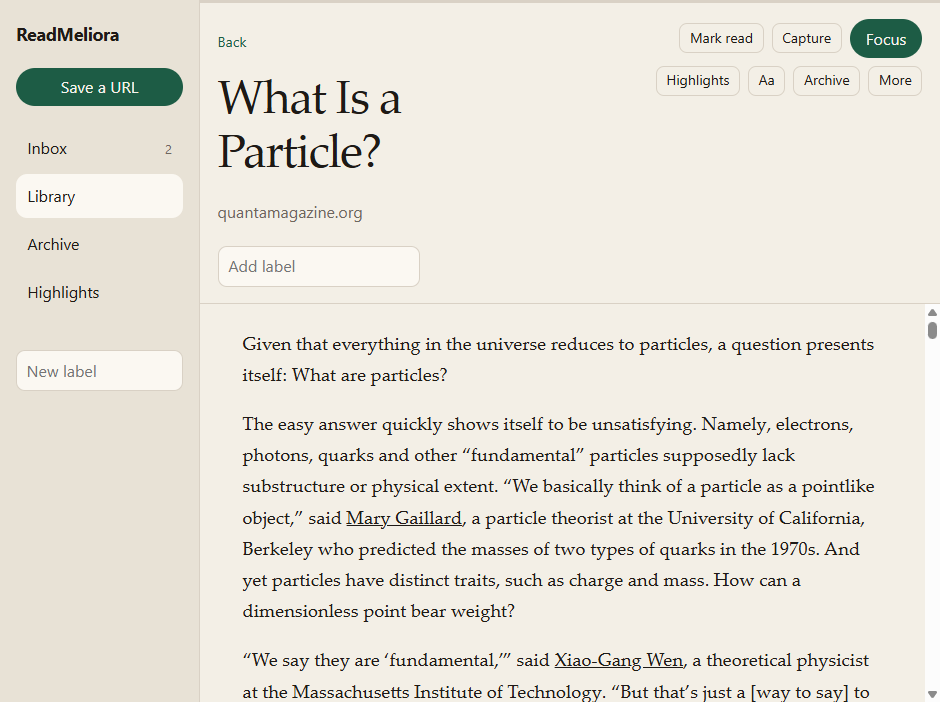
Archive is for finished-for-now reading. It is not delete. Highlights and notes stay on the article. You can still find it through search or the Highlights list.
Useful when you only cared about one section. Archive clears the list without throwing away the lines you marked.
You mark read
We do not auto-mark when you open an article. You tap read when you are done, or when you got enough out of it. No streaks, no “inbox zero” nagging.
Labels and search

Labels filter Inbox, Library, and Archive. Search runs over titles, body text, and notes. Select several rows at once to archive, label, or mark read in one go.
More on marks and notes in “Highlights that stay with the piece” on the blog.
A practical test
Put one nagging tab into ReadMeliora. Read what you can tonight. Leave it unread if you are mid-piece, or archive it if you are done. Your highlights will still be there either way.